API Gateway Filter
클라이언트의 요청에 따라 Gateway에서 어떤 서비스로 갈지 판단한 후 요청을 분기해준다.
https://www.inflearn.com/course/lecture?courseSlug=%EC%8A%A4%ED%94%84%EB%A7%81-%ED%81%B4%EB%9D%BC%EC%9A%B0%EB%93%9C-%EB%A7%88%EC%9D%B4%ED%81%AC%EB%A1%9C%EC%84%9C%EB%B9%84%EC%8A%A4&unitId=68416&tab=community&category=questionDetail
Gateway Handler Mapping
Predicate
Pre filter
Post filter
Gateway에 filterConfig를 추가하자
package com.example.gateway.config;

import org.springframework.cloud.gateway.route.RouteLocator;
import org.springframework.cloud.gateway.route.builder.RouteLocatorBuilder;
import org.springframework.context.annotation.Bean;
import org.springframework.context.annotation.Configuration;

@Configuration
public class FilterConfig {
    @Bean
    public RouteLocator gatewayRoutes(RouteLocatorBuilder builder){
        return builder.routes()
                .route(r -> r.path("/first-service/**")
                        .filters(f -> f.addRequestHeader("first-request","first-request-header")
                                .addResponseHeader("first-response","first-response-header"))
                        .uri("<http://localhost:8081>"))
                .route(r -> r.path("/second-service/**")
                        .filters(f -> f.addRequestHeader("second-request","second-request-header")
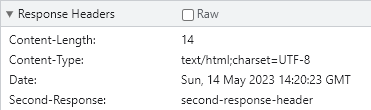
                                .addResponseHeader("second-response","second-response-header"))
                        .uri("<http://localhost:8082>"))
                .build();
    }
}
first-service로 오는 모든 요청에 first-request : first-request-header 헤더, 모든 응답에 first-response : first-response-header를 적용한다.
second도 마찬가지로 설정
UserService에 헤더 정보를 log로 찍어보자
package com.example.userservice;

import lombok.extern.slf4j.Slf4j;
import org.springframework.web.bind.annotation.GetMapping;
import org.springframework.web.bind.annotation.RequestHeader;
import org.springframework.web.bind.annotation.RestController;

@RestController("/")
@Slf4j
public class UserController {

    @GetMapping("first-service")
    public String first(){
        log.info("first 호출됨");
        return "first-service";
    }
    @GetMapping("first-service/message")
    public String firstMessage(@RequestHeader("first-request") String header){
        log.info(header);
        return "first-service";
    }

    @GetMapping("second-service")
    public String second(){
        log.info("second 호출됨");
        return "second-service";
    }
    @GetMapping("second-service/message")
    public String secondMessage(@RequestHeader("second-request") String header){
        log.info(header);
        return "second-service";
    }
}
application.yml 설정정보를 이용해 filter를 적용해보자
server:
    port: 8080

eureka:
    client:
        register-with-eureka: false
        fetch-registry: false
        service-url:
            defaultZone: <http://localhost:8761/eureka>
spring:
    application:
        name: gateway-service
    cloud:
        gateway:
            routes:
              - id: first-service
                uri: <http://localhost:8081/>
                predicates:
                    - Path=/first-service/**
                filters:
                  - AddRequestHeader=first-request, first-request-header2
                  - AddResponseHeader=first-response, first-response-header2
              - id: first-service
                uri: <http://localhost:8082/>
                predicates:
                    - Path=/second-service/**
                filters:
                    - AddRequestHeader=second-request, second-request-header2
                    - AddResponseHeader=second-response, second-response-header2
Spring Cloud Gateway Custom Filter
package com.example.gateway.filter;

import lombok.extern.slf4j.Slf4j;
import org.springframework.cloud.gateway.filter.GatewayFilter;
import org.springframework.cloud.gateway.filter.factory.AbstractGatewayFilterFactory;
import org.springframework.http.server.reactive.ServerHttpRequest;
import org.springframework.http.server.reactive.ServerHttpResponse;
import org.springframework.stereotype.Component;
import reactor.core.publisher.Mono;

@Component
@Slf4j
public class CustomFilter extends AbstractGatewayFilterFactory<CustomFilter.Config> {
    public CustomFilter() {
        super(Config.class);
    }
    @Override
    public GatewayFilter apply(Config config) {
       //Custom Prefilter
        return ((exchange, chain) -> {
           ServerHttpRequest request = exchange.getRequest();
           ServerHttpResponse response = exchange.getResponse();

           log.info("Custom PRE filter : request id -> {}", request.getId());

           //Custom Post Filter
            return chain.filter(exchange).then(Mono.fromRunnable(()->{
                log.info("Custom POST filter : response code -> {}", response.getStatusCode());
            }));
        });
    }

    public static class Config{
        //configuration 정보를 기입
    }
}
server:
    port: 8080

eureka:
    client:
        register-with-eureka: false
        fetch-registry: false
        service-url:
            defaultZone: <http://localhost:8761/eureka>
spring:
    application:
        name: gateway-service
    cloud:
        gateway:
            routes:
              - id: first-service
                uri: <http://localhost:8081/>
                predicates:
                    - Path=/first-service/**
                filters:
                  #- AddRequestHeader=first-request, first-request-header2
                  #- AddResponseHeader=first-response, first-response-header2
                  - CustomFilter
              - id: first-service
                uri: <http://localhost:8082/>
                predicates:
                    - Path=/second-service/**
                filters:
                    #- AddRequestHeader=second-request, second-request-header2
                    #- AddResponseHeader=second-response, second-response-header2
                  - CustomFilter
@GetMapping("second-service/check")
    public String checkSecond(){
        return "Hi, there, second check";
    }

    @GetMapping("first-service/check")
    public String checkFirst(){
        return "Hi, there, first check";
    }
정상 작동 확인
Spring Cloud Gateway - Global Filter
위에 사용했던 필터와 차이점
어떠한 라우트 정보가 실행된다 하더라도 공통적으로 수행될 수 있는 필터
개별적으로 등록된 CustomFilter
Global Filter 생성
package com.example.gateway.filter;

import lombok.Data;
import lombok.extern.slf4j.Slf4j;
import org.springframework.cloud.gateway.filter.GatewayFilter;
import org.springframework.cloud.gateway.filter.factory.AbstractGatewayFilterFactory;
import org.springframework.http.server.reactive.ServerHttpRequest;
import org.springframework.http.server.reactive.ServerHttpResponse;
import org.springframework.stereotype.Component;
import reactor.core.publisher.Mono;

@Component
@Slf4j
public class GlobalFilter extends AbstractGatewayFilterFactory<GlobalFilter.Config> {
    public GlobalFilter() {
        super(Config.class);
    }
    @Override
    public GatewayFilter apply(Config config) {
       //Custom Prefilter
        return ((exchange, chain) -> {
           ServerHttpRequest request = exchange.getRequest();
           ServerHttpResponse response = exchange.getResponse();

           log.info("Global Filter baseMessage : request id -> {}", config.getBaseMessage());

           if(config.isPreLogger()){
               log.info("Global Filter Start: request id -> {}", request.getId());
           }
           //Custom Post Filter
            return chain.filter(exchange).then(Mono.fromRunnable(()->{
                if(config.isPostLogger()){
                    log.info("Global Filter end: response code -> {}", response.getStatusCode());
                }
            }));
        });
    }
    @Data
    public static class Config{
        //configuration 정보를 기입
        private String baseMessage;
        private boolean preLogger;
        private boolean postLogger;
    }
}
server:
    port: 8080

eureka:
    client:
        register-with-eureka: false
        fetch-registry: false
        service-url:
            defaultZone: <http://localhost:8761/eureka>
spring:
    application:
        name: gateway-service
    cloud:
        gateway:
            default-filters:
              - name: GlobalFilter
                args:
                  baseMessage: Spring Cloud Gateway Filter
                  preLogger: true
                  PostLogger: true
            routes:
              - id: first-service
                uri: <http://localhost:8081/>
                predicates:
                    - Path=/first-service/**
                filters:
                  #- AddRequestHeader=first-request, first-request-header2
                  #- AddResponseHeader=first-response, first-response-header2
                  - CustomFilter
              - id: first-service
                uri: <http://localhost:8082/>
                predicates:
                    - Path=/second-service/**
                filters:
                    #- AddRequestHeader=second-request, second-request-header2
                    #- AddResponseHeader=second-response, second-response-header2
                    - CustomFilter
Global filter가 실행되고 Global filter가 종료되기 전 CustomFilter가 수행, 종료되고 그 이후 Global filter가 종료되는 모습을 확인할 수 있다.