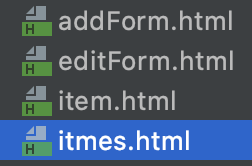
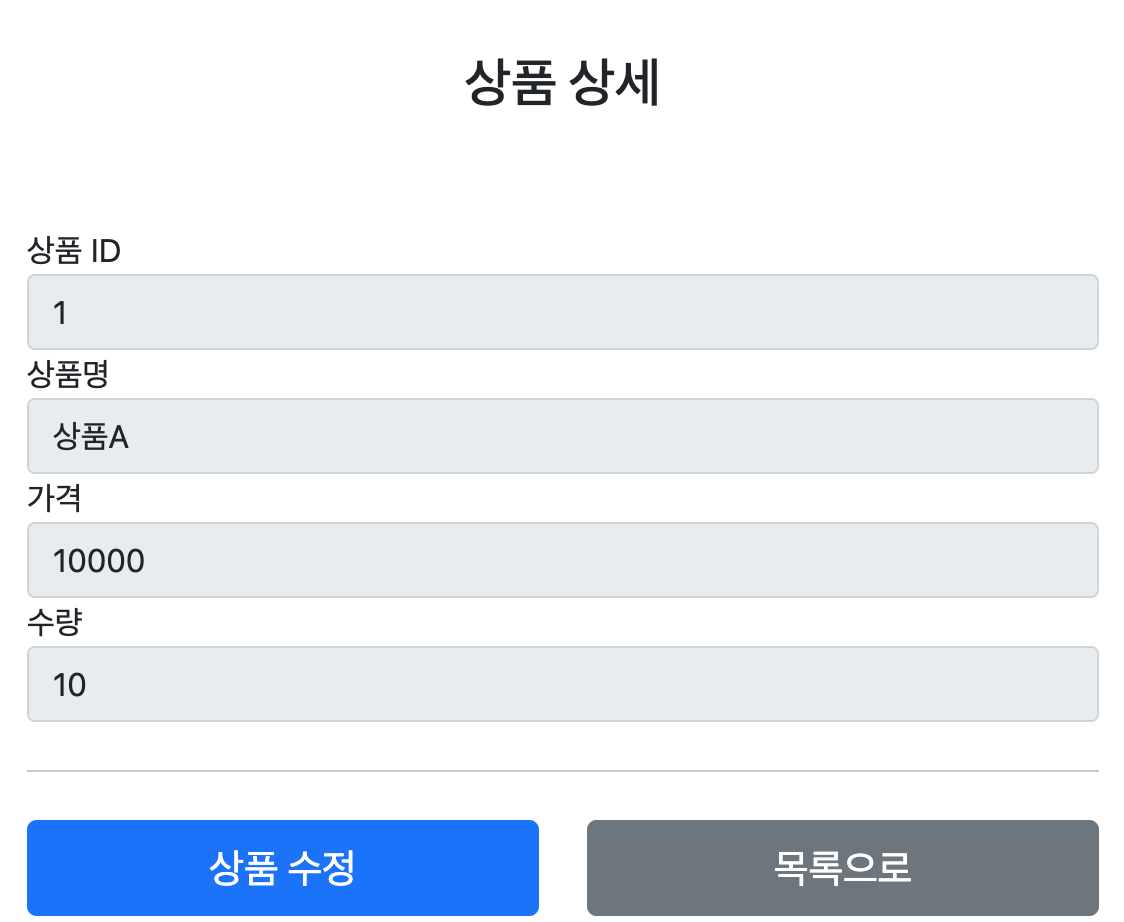
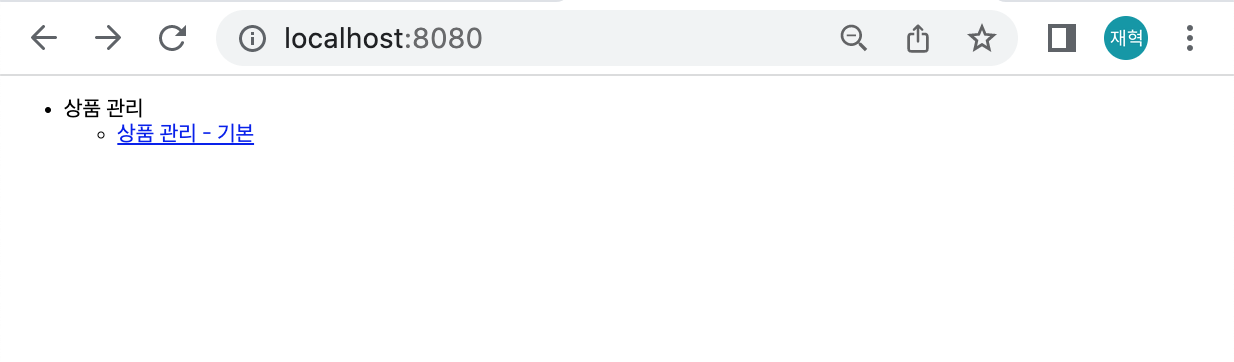
핵심 비즈니스 로직을 개발하는 동안, 웹 퍼블리셔는 HTML 마크업을 완료한 상황이다.

경로에 파일을 넣고 동작하는지 확인해보았다.(가정)


부트스트랩

HTML을 편리하게 개발하기 위해 부트스트랩을 사용했다.

웹 사이트를 쉽게 만들 수 있게 도와주는 HTML, CSS,JS 프레임워크이다.

하나의 CSS로 휴대폰, 태블릿, 데스크탑까지 다양한 기기에서 작동하고, 다양한 기능을 제공하여

사용자가 쉡게 웹사이트를 제작, 유지, 보수할 수 있도록 도와준다.


이런식으로 잘동작하는지 확인 해보았다. 서버를 띄우지 않아도 정적 리소스 이기 때문에 탐색기를 통해

직접 열어도 동작할 수 있다. 실제 서비스를 운영한다면 공개할 필요없는 HTML을 두는 것은 주의해야 한다.

'웹프로그래밍 > 스프링 MVC' 카테고리의 다른 글

56. 상품 상세  (0) 2022.04.18
55. 상품 목록 - 타임 리프  (0) 2022.04.16
53. 상품 도메인 개발  (0) 2022.04.15
52. 요구사항 분석  (0) 2022.04.14
51. 프로젝트 생성  (0) 2022.04.14

Item 상품 객체

package hello.itemservice.domain.item;

import lombok.Data;

@Data
public class Item {

    private Long id;
    private String itemName;
    private Integer price;
    private Integer quantity;

    public Item(){
    }

    public Item(String itemName, Integer price, Integer quantity) {
        this.itemName = itemName;
        this.price = price;
        this.quantity = quantity;
    }
}

변수의 타입을 래퍼클래스로 지정하였다. 널값으로 초기화 하는 이점이 존재한다.

Item 저장소 객체

package hello.itemservice.domain.item;

import org.springframework.stereotype.Repository;

import java.util.ArrayList;
import java.util.HashMap;
import java.util.List;
import java.util.Map;

@Repository
public class ItemRepository {

    private static final Map<Long, Item> store = new HashMap<>();
    private static long sequence = 0L;

    public Item save(Item item){
        item.setId(++sequence);
        store.put(item.getId(), item);
        return item;
    }

    public Item findById(Long id){
        return store.get(id);
    }

    public List<Item> findAll(){
        return new ArrayList<>(store.values());
    }

    public void update(Long itemId, Item updateParam){
        Item findItem = findById(itemId);
        findItem.setItemName(updateParam.getItemName());
        findItem.setPrice(updateParam.getPrice());
        findItem.setQuantity(updateParam.getQuantity());
    }

    public void clearStore(){
        store.clear();
    }
}

저장 기능, id값으로 찾는 기능, 모두 찾는 기능, 값을 변경하는 기능이 있다.


package hello.itemservice.item;

import hello.itemservice.domain.item.Item;
import hello.itemservice.domain.item.ItemRepository;
import org.assertj.core.api.Assertions;
import org.junit.jupiter.api.AfterEach;
import org.junit.jupiter.api.Test;

import java.util.List;

import static org.assertj.core.api.Assertions.*;

class ItemRepositoryTest {

    ItemRepository itemRepository = new ItemRepository();

    @AfterEach
    void afterEach(){
        itemRepository.clearStore();;
    }

    @Test
    void save(){
        //given
        Item item = new Item("itemA",10000,10);
        //when
        Item saveItem = itemRepository.save(item);
        //then
        Item findItem = itemRepository.findById(item.getId());
        assertThat(findItem).isEqualTo(saveItem);
    }

    @Test
    void findAll(){
        //given
        Item item1 = new Item("item1",10000,10);
        Item item2 = new Item("item2",20000,20);

        itemRepository.save(item1);
        itemRepository.save(item2);
        //when
        List<Item> result = itemRepository.findAll();
        //then
        assertThat(result.size()).isEqualTo(2);
        assertThat(result).contains(item1,item2);
    }

    @Test
    void updateItem(){
        //given
        Item item = new Item("item1",10000,10);
        Item savedItem = itemRepository.save(item);
        Long itemId = savedItem.getId();
        //when
        Item updateParam = new Item("item2", 20000, 30);
        itemRepository.update(itemId,updateParam);
        //then
        Item findItem = itemRepository.findById(itemId);
        assertThat(findItem.getItemName()).isEqualTo(updateParam.getItemName());
        assertThat(findItem.getPrice()).isEqualTo(updateParam.getPrice());
        assertThat(findItem.getQuantity()).isEqualTo(updateParam.getQuantity());

    }
}

저장소에 대한 테스트작업도 완료하였다.

'웹프로그래밍 > 스프링 MVC' 카테고리의 다른 글

55. 상품 목록 - 타임 리프  (0) 2022.04.16
54. 상품 서비스 HTML  (0) 2022.04.15
52. 요구사항 분석  (0) 2022.04.14
51. 프로젝트 생성  (0) 2022.04.14
50. 요청 매핑 핸들러 어댑터 구조  (0) 2022.04.11

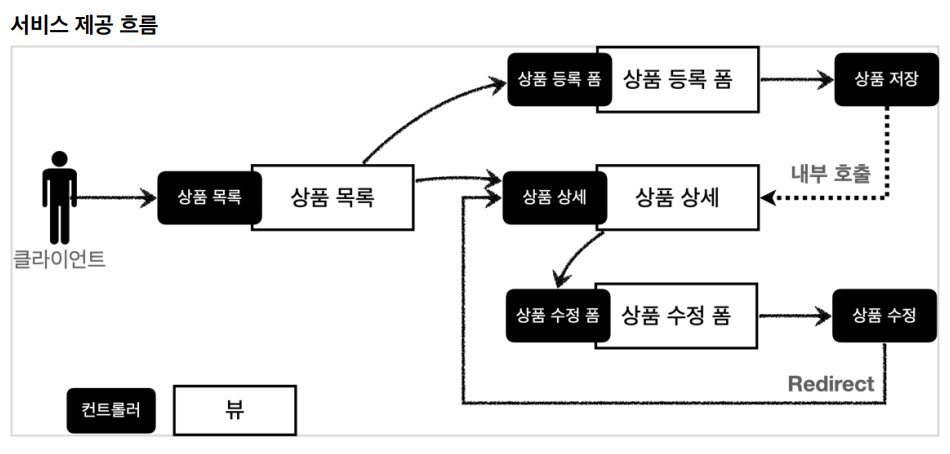
상품을 관리할 수 있는 간단한 서비스를 만들 예정이다.


상품 도메일 모델

- 상품 ID

- 상품명

- 가격

- 수량


상품 관리 기능

- 상품 목록

- 상품 상세

- 상품 등록

- 상품 수정


https://www.inflearn.com/course/%EC%8A%A4%ED%94%84%EB%A7%81-mvc-1/lecture/71230?volume=0.90&tab=note&speed=0.75

요구사항이 정리되고 디자이너, 웹 퍼블리셔, 백엔드 개발자가 업무를 나누어 진행한다.

- 디자니어 : 요구사항에 맞도록 디자인하고, 디자인 결과물을 웹 퍼블리셔에게 넘겨준다.

- 웹 퍼블리셔 : 디자이너에서 받은 디자인을 기반으로 HTML, CSS를 만들어 개발자에게 제공한다.

- 벡엔드 개발자 : 디자이너, 웹 퍼블리셔를 통해 HTML 화면이 나오기 전까지 시스템을 설계하고, 핵심 비즈니스

                          모델을 개발한다. 이후 HTML이 나오면 이 HTML을 뷰 템플릿으로 변환해서 동적으로 화면을 그리고, 또 웹 화면의 흐름                            을 제어한다.


React, Vue,js같은 웹 클라이언트 기술을 사용하고, 웹 프론트엔드 개발자가 별도로 있으면, 웹 프론트엔드 개발자가 웹 퍼블리셔

역할까지 포함해서 하는 경우도 있다. 웹 클라이언트 기술을 사용하면, 웹 프론트엔드 개발자가 HTML을 동적으로 만드는 역할과 웹 화면의

흐름을 담당한다. 이 경우 백엔드 개발자는 HTML뷰 템플릿을 직접 만지는 대신에, HTML 뷰 템플릿을 직접 만지는 대신에, HTTP API를 통해 웹 클라이언트가 필요로 하는 데이터와 기능을 제공하면 된다.

'웹프로그래밍 > 스프링 MVC' 카테고리의 다른 글

54. 상품 서비스 HTML  (0) 2022.04.15
53. 상품 도메인 개발  (0) 2022.04.15
51. 프로젝트 생성  (0) 2022.04.14
50. 요청 매핑 핸들러 어댑터 구조  (0) 2022.04.11
49. HTTP 메시지 컨버터  (0) 2022.04.08

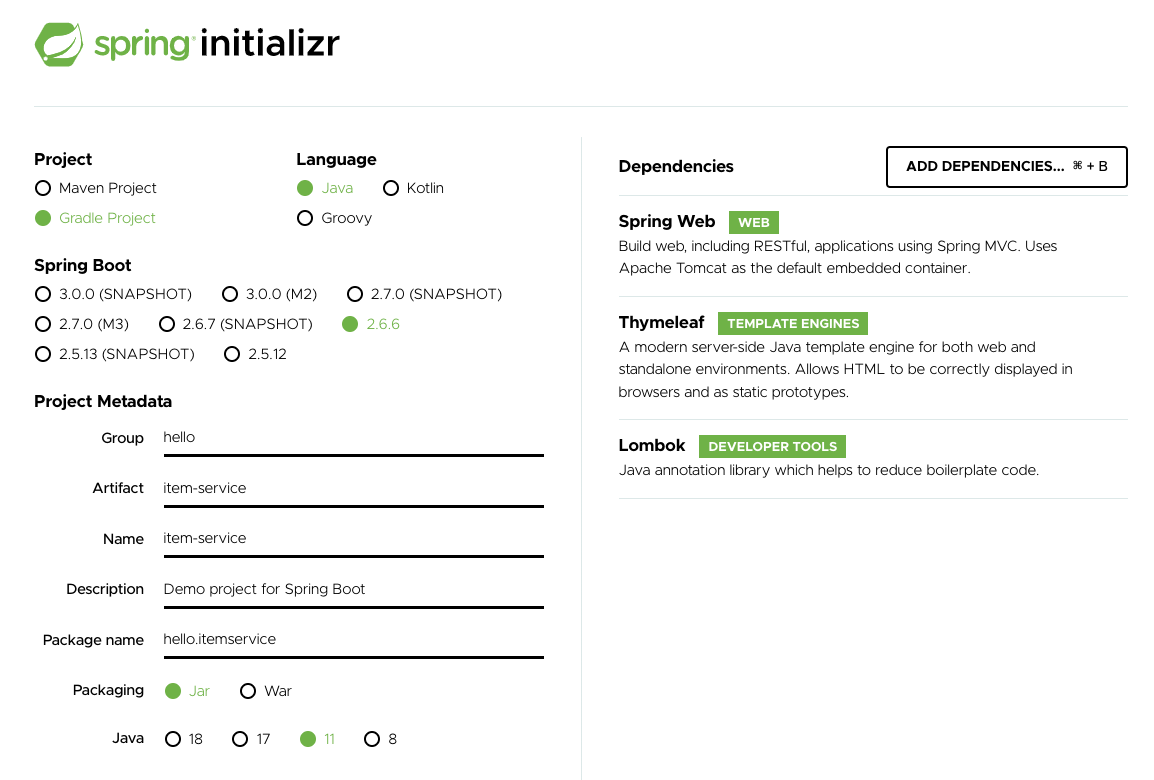
새로운 프로젝트를 만들기 위해 start.spring.io에서 gradle project에

Spring Web, Thymeleaf, Lombok을 추가하고 생성하였다.


기본 설정을 마치고 Whitelabel Error Page를 확인하였다.

<!DOCTYPE html>
<html>
<head>
    <meta charset="UTF-8">
    <title>Title</title>
</head>
<body>
<ul>
    <li>상품 관리
        <ul>
            <li><a href="/basic/items">상품 관리 - 기본</a></li>
        </ul>
    </li>
</ul>
</body>
</html>

기본 페이지도 생성하였다. (index.html) 


그렇다면 HTTP 메시지 컨버터는 스프링MVC 어디쯤에서 사용되는 것일까?


모든 비밀은 애노테이션 기반의 컨트롤러 , @RequestMapping 을 처리하는 핸들러 어댑터인

RequestMappingHandlerAdapter에 있다.

https://www.inflearn.com/course/%EC%8A%A4%ED%94%84%EB%A7%81-mvc-1/lecture/71226?volume=0.90&tab=note&speed=0.75

ArgumentResolver

애노테이션 기반의 컨트롤러는 매우 다양한 파라미터를 사용할 수 있었다.

HttpServletRequest, Model은 물론 @RequestParam, ModelAttribute같은 애노테이션 그리고

@RequestBody, HttpEntity 같은 HTTP 메시지를 처리하는 부분까지 매우 큰 유연함을 보여주었다.

이렇게 ㅍ파라미터를 유연하게 처리할 수 있는 이유가 바로 ArgumentResolver 덕분이다.


애노테이션 기반 컨트롤러를 처리하는 RequestMappingHandlerAdapterArgumentResolver를 호출해서

컨트롤러(핸들러)가 필요로 하는 다양한 파라미터의 값을 생성한다. 그리고 파라미터의 값이 모두 준비되면

컨트롤러를 호출하면서 값을 넘겨준다.


스프링은 30개가 넘는 ArgumentResolver를 기본으로 제공한다.

/*
 * Copyright 2002-2014 the original author or authors.
 *
 * Licensed under the Apache License, Version 2.0 (the "License");
 * you may not use this file except in compliance with the License.
 * You may obtain a copy of the License at
 *
 *      https://www.apache.org/licenses/LICENSE-2.0
 *
 * Unless required by applicable law or agreed to in writing, software
 * distributed under the License is distributed on an "AS IS" BASIS,
 * WITHOUT WARRANTIES OR CONDITIONS OF ANY KIND, either express or implied.
 * See the License for the specific language governing permissions and
 * limitations under the License.
 */

package org.springframework.web.method.support;

import org.springframework.core.MethodParameter;
import org.springframework.lang.Nullable;
import org.springframework.web.bind.WebDataBinder;
import org.springframework.web.bind.support.WebDataBinderFactory;
import org.springframework.web.context.request.NativeWebRequest;

/**
 * Strategy interface for resolving method parameters into argument values in
 * the context of a given request.
 *
 * @author Arjen Poutsma
 * @since 3.1
 * @see HandlerMethodReturnValueHandler
 */
public interface HandlerMethodArgumentResolver {

	/**
	 * Whether the given {@linkplain MethodParameter method parameter} is
	 * supported by this resolver.
	 * @param parameter the method parameter to check
	 * @return {@code true} if this resolver supports the supplied parameter;
	 * {@code false} otherwise
	 */
	boolean supportsParameter(MethodParameter parameter);

	/**
	 * Resolves a method parameter into an argument value from a given request.
	 * A {@link ModelAndViewContainer} provides access to the model for the
	 * request. A {@link WebDataBinderFactory} provides a way to create
	 * a {@link WebDataBinder} instance when needed for data binding and
	 * type conversion purposes.
	 * @param parameter the method parameter to resolve. This parameter must
	 * have previously been passed to {@link #supportsParameter} which must
	 * have returned {@code true}.
	 * @param mavContainer the ModelAndViewContainer for the current request
	 * @param webRequest the current request
	 * @param binderFactory a factory for creating {@link WebDataBinder} instances
	 * @return the resolved argument value, or {@code null} if not resolvable
	 * @throws Exception in case of errors with the preparation of argument values
	 */
	@Nullable
	Object resolveArgument(MethodParameter parameter, @Nullable ModelAndViewContainer mavContainer,
			NativeWebRequest webRequest, @Nullable WebDataBinderFactory binderFactory) throws Exception;

}

정확히는 HandlerMethodArgumentResolver인데 줄여서 ArgumentResolver 라고 부름


동작방식

ArgumentResolver의 supportParameter()를 호출해서 해당 파라미터를 지원하는지 체크하고, 지원하면 resolveArgument()를 호출해서 실제 객체를 생성한다. 그리고 이렇게 생성된 객체가 컨트롤러 호출시 넘어가는 것이다.

그리고 원한다면 사용자가 인터페이스를 확장해서 원하는 ArgumentResolver를 만들 수도 있다.


ReturnValueHandler

HandlerMethodResutrnValueHandler를 줄여서 ReturnValueHandler 라 부른다.

ArgumentResolver와 비슷한데, 이것은 응답 값을 변환하고 처리한다.


컨트롤러에서  String으로 뷰 이름을 반환해도, 동작하는 이유가 바로 ReturnValueHandler 덕분이다.


https://www.inflearn.com/course/%EC%8A%A4%ED%94%84%EB%A7%81-mvc-1/lecture/71226?volume=0.90&tab=note&speed=0.75

HTTP 메시지 컨버터는 어디있을까?

HTTP 메시지 컨버터를 사용하는 @RequestBody도 컨트롤러가 필요로 하는 파라미터 값에 사용된다.

@ResponseBody의 경우도 컨트롤러의 반환 값을 이용한다.


요청의 경우 @RequestBody 를 처리한느 ArgumentResolver가 있고, HttpEntity를 처리하는 ArgumentResolver가 있다.

이 ArgumentResolver들이 HTTP 메시지 컨버터를 사용해서 필요한 객체를 생성하는 것이다.


응답의 경우 @ResponseBody와 HttpEntity를 처리하는 ReturnValueHandler가 있다. 그리고 여기에서 HTTP 메시지

컨버터를 호출해서 응답 결과를 만든다.


스프링 MVC는 @RequestBody @ResponseBody가 있으면

RequestResponseBodyMethodProcessor(ArgumentResolver)

HttpEntity가 있으면 HttpEntityMethodProcessor(ArgumentResolver)를 사용한다.


뷰 템플릿으로 HTML을 생성해서 응답하는 것이 아니라, HTTP API처럼 JSON 데이터를 HTTP 메시지 바디에서

직접 읽거나 쓰는 경우 HTTP 메시지 컨버터를 사용하면 편리하다.


@ResponseBody를 사용

 - HTTP의 Body에 문자 내용을 직접 반환

 - viewResolver 대신에 HttpMessageConverter가 동작

 - 기본 문자처리 : StringHttpMessageConverter

 - 기본 객체처리 : MappingJackson2HttpMessageConverter

 - byte 처리 등등 기타 여러 HttpMessageConverter가 기본으로 등록되어 있음


응답의 경우 클라이언트의 HTTP Accept헤더와 서버의 컨트롤러 반환 타입 정보 둘을 조합해서

HttpMessageConverter가 선택된다. 


스프링 MVC는 다음의 경우에 HTTP 메시지 컨버터를 적용한다.

HTTP 요청 : @RequestBody, HttpEntity(RequestEntity),

HTTP 응답 : @ResponseBody, HttpEntity(ResponseEntity)

/*
 * Copyright 2002-2021 the original author or authors.
 *
 * Licensed under the Apache License, Version 2.0 (the "License");
 * you may not use this file except in compliance with the License.
 * You may obtain a copy of the License at
 *
 *      https://www.apache.org/licenses/LICENSE-2.0
 *
 * Unless required by applicable law or agreed to in writing, software
 * distributed under the License is distributed on an "AS IS" BASIS,
 * WITHOUT WARRANTIES OR CONDITIONS OF ANY KIND, either express or implied.
 * See the License for the specific language governing permissions and
 * limitations under the License.
 */

package org.springframework.http.converter;

import java.io.IOException;
import java.util.Collections;
import java.util.List;

import org.springframework.http.HttpInputMessage;
import org.springframework.http.HttpOutputMessage;
import org.springframework.http.MediaType;
import org.springframework.lang.Nullable;

/**
 * Strategy interface for converting from and to HTTP requests and responses.
 *
 * @author Arjen Poutsma
 * @author Juergen Hoeller
 * @author Rossen Stoyanchev
 * @since 3.0
 * @param <T> the converted object type
 */
public interface HttpMessageConverter<T> {

	/**
	 * Indicates whether the given class can be read by this converter.
	 * @param clazz the class to test for readability
	 * @param mediaType the media type to read (can be {@code null} if not specified);
	 * typically the value of a {@code Content-Type} header.
	 * @return {@code true} if readable; {@code false} otherwise
	 */
	boolean canRead(Class<?> clazz, @Nullable MediaType mediaType);

	/**
	 * Indicates whether the given class can be written by this converter.
	 * @param clazz the class to test for writability
	 * @param mediaType the media type to write (can be {@code null} if not specified);
	 * typically the value of an {@code Accept} header.
	 * @return {@code true} if writable; {@code false} otherwise
	 */
	boolean canWrite(Class<?> clazz, @Nullable MediaType mediaType);

	/**
	 * Return the list of media types supported by this converter. The list may
	 * not apply to every possible target element type and calls to this method
	 * should typically be guarded via {@link #canWrite(Class, MediaType)
	 * canWrite(clazz, null}. The list may also exclude MIME types supported
	 * only for a specific class. Alternatively, use
	 * {@link #getSupportedMediaTypes(Class)} for a more precise list.
	 * @return the list of supported media types
	 */
	List<MediaType> getSupportedMediaTypes();

	/**
	 * Return the list of media types supported by this converter for the given
	 * class. The list may differ from {@link #getSupportedMediaTypes()} if the
	 * converter does not support the given Class or if it supports it only for
	 * a subset of media types.
	 * @param clazz the type of class to check
	 * @return the list of media types supported for the given class
	 * @since 5.3.4
	 */
	default List<MediaType> getSupportedMediaTypes(Class<?> clazz) {
		return (canRead(clazz, null) || canWrite(clazz, null) ?
				getSupportedMediaTypes() : Collections.emptyList());
	}

	/**
	 * Read an object of the given type from the given input message, and returns it.
	 * @param clazz the type of object to return. This type must have previously been passed to the
	 * {@link #canRead canRead} method of this interface, which must have returned {@code true}.
	 * @param inputMessage the HTTP input message to read from
	 * @return the converted object
	 * @throws IOException in case of I/O errors
	 * @throws HttpMessageNotReadableException in case of conversion errors
	 */
	T read(Class<? extends T> clazz, HttpInputMessage inputMessage)
			throws IOException, HttpMessageNotReadableException;

	/**
	 * Write an given object to the given output message.
	 * @param t the object to write to the output message. The type of this object must have previously been
	 * passed to the {@link #canWrite canWrite} method of this interface, which must have returned {@code true}.
	 * @param contentType the content type to use when writing. May be {@code null} to indicate that the
	 * default content type of the converter must be used. If not {@code null}, this media type must have
	 * previously been passed to the {@link #canWrite canWrite} method of this interface, which must have
	 * returned {@code true}.
	 * @param outputMessage the message to write to
	 * @throws IOException in case of I/O errors
	 * @throws HttpMessageNotWritableException in case of conversion errors
	 */
	void write(T t, @Nullable MediaType contentType, HttpOutputMessage outputMessage)
			throws IOException, HttpMessageNotWritableException;

}

HTTP 메시지 컨버터 인터페이스

HTTP 메시지 컨버터는 HTTP 요청, HTTP 응답 둘 다 사용된다.

canRead(), canWrite() : 메시지 컨버터가 해당 클래스, 미디어 타입을 지원하는지 체크

read(), write() : 메시지 컨버터를 통해서 메시지를 읽고 쓰는 기능


스프링 부트 기본 메시지 컨버터

우선순위

0 = ByteArrayHttpMessageConverter

1 = StringHttpMessageConverter

2 = MappingJackson2HttpMessageConverter

등등


스프링 부트는 다양한 메시지 컨버터를 제공하는데, 대상 클래스 타입과 미디어 타입 둘을 체크하고

사용여부를 결정한다. 


ByteArrayHttpMessageConverter : byte[] 데이터를 처리한다.

 - 클래스 타입: byte[] , 미디어타입: */*

 - 요청 예) @RequestBody byte[] data

 - 응답 예) @ResponseBody return byte[] 쓰기 미디어타입 application/octet-stream


StringHttpMessageConverter : String 문자로 데이터를 처리한다.

 - 클래스 타입: String , 미디어타입: */*

 - 요청 예) @RequestBody String data 응답 예) @ResponseBody return "ok" 쓰기 미디어타입 text/plain


MappingJackson2HttpMessageConverter : application/json

 - 클래스 타입: 객체 또는 HashMap , 미디어타입 application/json 관련

 - 요청 예) @RequestBody HelloData data

 - 응답 예) @ResponseBody return helloData 쓰기 미디어타입 application/json 관련


HTTP 요청 데이터 읽기

HTTP 요청이 옴 -> 컨트롤러에서 @RequestBody, HttpEntity 파라미터를 사용한다.

메시지 컨버터가 메시지를 읽을 수 있는지 확인하는 canRead() 호출

 - 대상 클래스 타입을 지원하는가? (byte[], String, HelloData)

 - HTTP 요청의 Content-type 미디어 타입을 지원하는가? (text/plain, application/json, */*)

조건을 만족하면 read() 호출하여 객체 생성후 반환함


HTTP 응답 데이터 생성

컨트롤러에서 @ResponseBody, HttpEntity로 값이 반환된다.

메시지 컨버터가 메시지를 쓸 수 있는지 확인하기 위해 write() 호출

 - 대상 클래스 타입을 지원하는가? (return의 대상 클래스)

 - HTTP요청의 Accept 미디어 타입을 지원하는가?(text/palin, application/json, */*)

조건을 만족하면 write()를 호출하여 HTTP 응답 메시지 바디에 데이터를 생성한다.

HTTP API를 제공하는 경우에는 HTML이 아니라 데이터를 전달해야 하므로, HTTP 메시지 바디에 JSON 같은 형식으로

데이터를 실어 보낸다. 


HTML이나 뷰 템플릿을 사용해도 HTTP 응답 메시지 바디에 HTML 데이터가 담겨서 전달된다. 

package hello.springmvc.basic.response;

import hello.springmvc.basic.HelloData;
import lombok.extern.slf4j.Slf4j;
import org.springframework.http.HttpStatus;
import org.springframework.http.ResponseEntity;
import org.springframework.stereotype.Controller;
import org.springframework.web.bind.annotation.GetMapping;
import org.springframework.web.bind.annotation.ResponseBody;
import org.springframework.web.bind.annotation.ResponseStatus;

import javax.servlet.http.HttpServletResponse;
import java.io.IOException;

@Slf4j
@Controller
public class ResponseBodyController {

    @GetMapping("/response-body-string-v1")
    public void responseBodyV1(HttpServletResponse response) throws IOException {
        response.getWriter().write("ok");
    }

    @GetMapping("/response-body-string-v2")
    public ResponseEntity<String> responseBodyV2() throws IOException {
        return new ResponseEntity<>("ok", HttpStatus.OK);
    }

    @ResponseBody
    @GetMapping("/response-body-string-v3")
    public String responseBodyV3() throws IOException {
        return "ok";
    }

    @GetMapping("/response-body-json-v1")
    public ResponseEntity<HelloData> responseBodyJsonV1(){
        HelloData helloData = new HelloData();
        helloData.setUsername("userA");
        helloData.setAge(20);

        return new ResponseEntity<>(helloData,HttpStatus.OK);
    }

    @ResponseStatus(HttpStatus.OK)
    @ResponseBody
    @GetMapping("/response-body-json-v2")
    public HelloData responseBodyJsonV2(){
        HelloData helloData = new HelloData();
        helloData.setUsername("userA");
        helloData.setAge(20);

        return helloData;
    }
    
}

5가지 방법 정도 만들어 보았다.


responseBodyV1

서블릿을 직접 다룰 때 처럼

HttpServletResponse 객체를 통해서 HTTP 메시지 바디에 직접 ok응답 메시지를 전달한다.


responseBodyV2

ResponseEntity엔티티는 HttpEntity를 상속 받았는데, HttpEntity는 HTTP메시지의 헤더, 바디 정보를 가지고 있다.

ResponseEntity는 여기에 더해서 Http응답 코드를 설정할 수 있다.


responseBodyV3

@ResponseBody를 사용하면  view를 사용하지 않고, HTTP 메시지 컨버터를 통해서 HTTP 메시지를 직접

입력할 수 있다.ResponseEntity도 동일한 방식으로 동작한다.


responseBodyJsonV1

ResponseEntity를 반환한다. HTTP메시지 컨버터를 통해서  JSON 형식으로 변환되어 반환된다.


responseBodyJsonV2

ResponseEntity는 HTTP 응답 코드를 설정 할 수 있는데  @ResponseBody를 사용하면 이런 것을

설정하기가 까다롭다.

@ResponseSatatus애너테이션을 사용하면 응답코드를 설정 할 수 있다.

동적으로 변경하기 위해선 ResponseEntity를 사용하면 된다.


@RestController

@Controller 대신에 @RestController를 사용하면 해당 컨트롤러에 @ResponseBody가 적용되는 효과가 있다.

따라서 뷰 템플릿을 사용하는 것이 아니라, HTTP 메시지 바디에 직접 데이터를 입력한다. 이름 그대로

RestAPI를 만들때 사용하는 컨트롤러이다.

응답 데이터는 계속 공부해왔지만, 응답 부분에 초첨을 맞춰서 정리해보았다.

스프링에서 응답 데이터를 만드는 방법은 크게 3가지이다


정적 리소스

 - 웹 브라우저에 정적인 HTML,css,js를 제공할 때는, 정적 리소스를 사용한다.


뷰 템플릿 사용

 - 웹 브라우저에 동적인 HTML을 제공할 때는 뷰 템플릿을 사용한다


HTTP 메시지 사용

 - HTTP API를 제공하는 경우에 HTML이 아니라 데이터를 전달해야 하므로, HTTP 메시지 바디에 JSON같은

    형식으로 데이터를 실어 보낸다.


정적 리소스

스프링 부트느 클래스패스의 다음 디렉토리에 있는 정적 리소스를 제공한다.

/static, /public, /resources, /META-INF/resources


src/main/resources는 리소스를 보관하는 곳이고, 또 클래스패스의 시작 경로이다.

따라서 다음 디렉토리에 리소스를 넣어두면 스프링 부트가 정적 리소스로 서비스를 제공한다.


정적 리소스 경로

src/main/resources/static


다음 경로에 파일이 들어있으면 

src/main/resources/static/basic/hello-form.html


웹 브라우저에서 다음과 같이 실행하면 된다.

http://localhost:8080/basic/hello-form.html


정적 리소스는 해당 파일을 변경 없이 그대로 서비스 하는 것이다.


뷰 템플릿

뷰 템플릿을 거쳐서 HTML이 생성되고, 뷰가 응답을 만들어서 전달한다.

일반적으로 HTML을 동적으로 생성하는 용도로 사용하지만, 다른 것들도 가능하다. 뷰 템플릿이 만들 수 있는

것이라면 뭐든지 가능하다. 스프링 부트는 기본 뷰 템플릿 경로를 제공한다.


뷰 템플릿 경로

src/main/resources/templates


뷰 템플릿 생성

src/main/resources/templates/response/hello.html

<!DOCTYPE html>
<html xmlns:th="http://www.thymeleaf.org">
<head>
    <meta charset="UTF-8">
    <title>Title</title>
</head>
<body>
<p th:text="${data}">empty</p>
</body>
</html>
package hello.springmvc.basic.response;

import org.springframework.stereotype.Controller;
import org.springframework.ui.Model;
import org.springframework.web.bind.annotation.RequestMapping;
import org.springframework.web.servlet.ModelAndView;

@Controller
public class ResponseViewController {

    @RequestMapping("/response-view-v1")
    public ModelAndView responseViewV1(){
        ModelAndView mav = new ModelAndView("response/hello")
                .addObject("data","hello");
        return mav;
    }

    @RequestMapping("/response-view-v2")
    public String responseViewV2(Model model){
        model.addAttribute("data","hello");
        return "response/hello";
    }
}

String을 반환하는 경우 - View or HTTP 메시지

@ResponseBody가 없으면 response/hello로 뷰 리졸버가 실행되어서 뷰를 찾고, 랜더링 한다.

@ResponseBody가 있으면 뷰 리졸버를 실행하지않고, HTTP 메시지 바디에 직접 Response/hello라는 문자가 입력된다.


여기서는 뷰의 논리 이름인 response/hello를 반환하면 다음 경로의 뷰 템플릿이 렌더링 되는 것을 확인할 수 있다.

실행 : templates/response/hello.html


Void를 반환하는 경우

@Controller를 사용하고, HttpServletResponse, OutputStream(Writer) 같은 HTTP 메시지

바디를 처리하는 파라미터가 없으면 요청 URL을 참고해서 논리 뷰 이름으로 사용

 - 요청 URL : /response/hello

 - 실행 : templates/response/hello.html

이 방식은 명시성이 너무 떨어지고 이렇게 딱 맞는 경우도 많이 없어서, 권장하지 않는다.


HTTP 메시지

@ResponseBody, HttpEntity를 사용하면, 뷰 템플릿을 사용하는 것이 아니라, HTTP 메시지 바디에 직접 응답 데이터를 출력할 수 있다.

이번에는 HTTP API에서 주로 사용하는 JSON 데이터 형식을 조회해보았다.


package hello.springmvc.basic.request;

import com.fasterxml.jackson.databind.ObjectMapper;
import hello.springmvc.basic.HelloData;
import lombok.extern.slf4j.Slf4j;
import org.springframework.stereotype.Controller;
import org.springframework.util.StreamUtils;
import org.springframework.web.bind.annotation.PostMapping;
import org.springframework.web.bind.annotation.RequestBody;
import org.springframework.web.bind.annotation.ResponseBody;

import javax.servlet.ServletInputStream;
import javax.servlet.http.HttpServletRequest;
import javax.servlet.http.HttpServletResponse;
import java.io.IOException;
import java.nio.charset.StandardCharsets;

@Slf4j
@Controller
public class RequestBodyJsonController {

    private ObjectMapper objectMapper = new ObjectMapper();

    @PostMapping("/request-body-json-v1")
    public void requestBodyJsonV1(HttpServletRequest request, HttpServletResponse response) throws IOException {
        ServletInputStream inputStream = request.getInputStream();
        String messageBody = StreamUtils.copyToString(inputStream, StandardCharsets.UTF_8);

        log.info("messageBody={}",messageBody);
        HelloData helloData= objectMapper.readValue(messageBody, HelloData.class);
        log.info("username={}, age={}",helloData.getUsername(), helloData.getAge());

        response.getWriter().write("ok");

    }

    @ResponseBody
    @PostMapping("/request-body-json-v2")
    public String requestBodyJsonV2(@RequestBody String messageBody) throws IOException{


        log.info("messageBody={}",messageBody);
        HelloData helloData= objectMapper.readValue(messageBody, HelloData.class);
        log.info("username={}, age={}",helloData.getUsername(), helloData.getAge());

        return "ok";
    }

    @ResponseBody
    @PostMapping("/request-body-json-v3")
    public String requestBodyJsonV3(@RequestBody HelloData helloData){

        log.info("username={}, age={}",helloData.getUsername(), helloData.getAge());
        return "ok";
    }
}

먼저 3가지 방법으로 해보았다.

1번 방법은 

HttpServletRequest를 사용해서 직접 HTTP 메시지 바디에서 데이터를 읽어오고, 문자로 변환하고

ObjectMapper를 사용해서 자바 객체로 변환하였다.


2번 방법은

@RequestBody를 사용해서 HTTP 메시지에서 데이터를 꺼내고 messageBody에 저장한다.

문자로 된 JSON 데이터인 messageBody를 objectMapper를 통해서 자바 객체로 변환한다.


여기서 @ModelAttrubete처럼 한번에 객체로 변환하는 방법이 3번방법에서 쓰인다.

@RequestBody 객체 파라미터

@RequestBody HelloData helloData

@RequestBody에 직접 만든 객체를 지정할 수 있다.


HttpEntity, @RequestBody를 사용하면 HTTP 메시지 컨버터가 HTTP 메시지 바디의 내용을 우리가

원하는 문자나 객체 등으로 변환해준다.


HTTP 메시지 컨버터는 문자 뿐만 아니라 JSON도 객체로 변환해주는데, 방금 V2에서 했던 작업을 대신

처리해준다.


@RequestBody는 생략 불가능


@ModelAttrubute,@RequestParam은 생략시 규칙이 있다.

String, int ,Integer 같은 단순 타입은 @RequestParam

나머지 경우에 @ModelAttribute(argument resolver로 지정해둔 타입 외)


따라서 이 경우 HelloData에 @RequestBody를 생략하면 @ModelAttribte가 적용되어 버린다.

HelloData data -> @ModelAttribute HelloData helloData

생략하면 HTTP 메시지 바디가 아니라 요청 파라미터를 처리하게 된다.


    @ResponseBody
    @PostMapping("/request-body-json-v4")
    public String requestBodyJsonV4(HttpEntity<HelloData> data){
        HelloData helloData = data.getBody();
        log.info("username={}, age={}",helloData.getUsername(), helloData.getAge());
        return "ok";
    }

    @ResponseBody
    @PostMapping("/request-body-json-v5")
    public HelloData requestBodyJsonV5(@RequestBody HelloData helloData){
        log.info("username={}, age={}",helloData.getUsername(), helloData.getAge());
        return helloData;
    }

4번 방법은 앞선 포스팅에서 나왔던 HttpEntity를 사용하였다. 제네릭이란 무지하게 편리한것 같다.


5번 방법은

@ResponseBody

응답은 경우에도 @ResponseBody를 사용하면 해당 객체를 HTTP 메시지 바디에 직접 넣어줄 수 있다.

물론 이 경우에도 HttpEntity를 사용해도 된다.


@RequestBody 요청

 - JSON 요청 -> HTTP 메시지 컨버터 -> 객체


@ResponseBody 응답

 - 객체 -> HTTP 메시지 컨버터 -> JSON응답

HTTP message body에 데이터를 직접 담아서 요청

  - HTTP API에서 주로 사용, JSON, XML, TEXT

  - 데이터 형식은 주로  JSON 사용

  - POST, PUT, PATCH


요청 파라미터와 다르게, HTTP 메시지 바디를 통해 데이터가 직접 데이터가 넘어오는 경우는 

@RequestParam, @ModelAttribute 를 사용할 수 없다. 물론 HTML Form 형식으로 전달되는 경우는

요청 파라미터로 인정된다.


먼저 가장 단순한 텍스트 메시지를 HTTP 메시지 바디에 담아서 전송하고, 읽어보았다.

HTTP 메시지 바디에 데이터를 InputStream을 사용해서 직접 읽을 수 있다.


package hello.springmvc.basic.request;

import lombok.extern.slf4j.Slf4j;
import org.springframework.http.HttpEntity;
import org.springframework.stereotype.Controller;
import org.springframework.util.StreamUtils;
import org.springframework.web.bind.annotation.PostMapping;

import javax.servlet.ServletInputStream;
import javax.servlet.http.HttpServletRequest;
import javax.servlet.http.HttpServletResponse;
import java.io.IOException;
import java.io.InputStream;
import java.io.OutputStream;
import java.io.Writer;
import java.nio.charset.StandardCharsets;

@Slf4j
@Controller
public class RequestBodyStringController {

    @PostMapping("/request-body-string-v1")
    public void requestBodyString(HttpServletRequest request, HttpServletResponse response)throws IOException {
        ServletInputStream inputStream = request.getInputStream();
        String messageBody = StreamUtils.copyToString(inputStream, StandardCharsets.UTF_8);

        log.info("messageBody={}",messageBody);

        response.getWriter().write("ok");
    }

    @PostMapping("/request-body-string-v2")
    public void requestBodyStringV2(InputStream inputStream, Writer responseWriter)throws IOException {

        String messageBody = StreamUtils.copyToString(inputStream, StandardCharsets.UTF_8);
        log.info("messageBody={}",messageBody);
        responseWriter.write("ok");
    }

    @PostMapping("/request-body-string-v3")
    public HttpEntity<String> requestBodyStringV3(HttpEntity<String> httpEntity)throws IOException {

        String messageBody = httpEntity.getBody();
        log.info("messageBody={}",messageBody);

        return new HttpEntity<>("ok");
    }

}


두번째 방법은

InputStream, OutputStream을 사용하였다.

스프링은 이들을 지원하고 

전자는 HTTP 요청 메시지 바디의 내용을 직접 조회하고

후자는 HTTP 응답 메시지의 바디에 직접 결과를 출력한다.


세번째 방법은

HttpEntity를 사용하였다.


HttpEntitiy : Http header, body정보를 편리하게 조회한다.

 - 메시지 바디 정보를 직접 조회

 - 요청 파라미터를 조회하는 기능과 관계없음 (@RequestParam , @ModelAttribute) 이 둘과 관계없음


HttpEntity는 응답에도 사용 가능

 - 메시지 바디 정보 직접 반환

 - 헤더 정보 포함 가능

 - view 조회 하지않음


@ResponseBody
    @PostMapping("/request-body-string-v4")
    public String requestBodyStringV4(@RequestBody String messageBody) {
        log.info("messageBody={}",messageBody);

        return "ok";
    }

4번째 방법이다.

@RequestBody

@RequestBody를 사용하면 HTTP 메시지 바디 정보를 편리하게 조회할 수 있다. 참고로 헤더 정보가

필요하다면 HttpEntity를 사용하거나 @RequestHeader를 사용하면 된다.

이렇게 메시지 바디를 직접 조회하는 기능은 요청 파라미터를 조회하는 @RequestParam,@ModelAttribute와는 전혀 관계가 없다.


요청 파라미터 VS HTTP 메시지 바디

요청 파라미터를 조회하는 기능 :  @RequestParam, @ModelAttribute

Http 메시지 바디를 직접 조회하는 기능 : @RequestBody


@ResponseBody

@ResponseBody를 사용하면 응답 결과를 HTTP 메시지 바디에 직접 담아서 전달할 수 있다.

물론 이 경우에도  view를 사용하지 않는다.

+ Recent posts