입력으로 하나의 직교 다각형(모든 변이 x축 혹은 y축과 평행한 다각형)의 또 하나의 점 p가 주어질 때 그 점이 다각형의 내부에 있는지
외부에 있는지 판단하는 프로그램을 작성하라
입력 형식의 예 시계방향으로 꼭지점의 좌표가 주어짐
8 // 꼭지점의 개수
0 0 //첫번째 꼭지점 x,y 좌표
16 0
16 18
10 18
10 6
6 6
6 12
0 12 //마지막 꼭지점의 x,y 좌표
7 7 //테스트할 점 p의 좌표
내부 / 외부 검사
점에서 시작하여 한 방향으로 무한히 뻗어가는 아무 직선이나 하나 그어서
그것이 다각형의 변과 짝수 번 교차하면 외부, 홀수번 교차하면 내부에 있다.
문제는 그은 직선이 겹치게된다면 ???
꼭지점의 좌표값은 모두 짝수, 검사할 점 좌표값은 홀수로 가정한다.
package section2;

import java.io.File;
import java.io.FileNotFoundException;
import java.util.Scanner;

public class code10 {

	public static void main(String[] args) {

		try {
			Scanner in = new Scanner(new File("data.txt"));
			int n = in.nextInt();
			OrthPolygon thePolygon = new OrthPolygon(n);
			for(int i =0; i<n; i++)
				thePolygon.addVertex(in.nextInt(),in.nextInt());
			Mypoint2 thePoint = new Mypoint2(in.nextInt(),in.nextInt());
			in.close();
			if(thePolygon.contains(thePoint))
				System.out.println("Yes");
			else
				System.out.println("No");
		}catch(FileNotFoundException e) {
			System.out.println("No data file exists");
			System.exit(1);
		}

	}

}
메인 함수 클래스!
package section2;

public class OrthLine {
	public Mypoint2 u;
	public Mypoint2 v;

	public OrthLine(Mypoint2 p, Mypoint2 q){
		u =p;
		v= q;
		if(p.x>q.x || p.x==q.x && p.y>q.y)
			swap();
	}

	private void swap() {
		Mypoint2 tmp = u;
		u =v;
		v=tmp;
	}

	public OrthLine(int x, int y, int x1, int y1){
		u =new Mypoint2(x,y);
		v = new Mypoint2(x1,y1);
	}

	public boolean isVertical() {
		return (u.x == v.x);
	}

	public boolean intersects(OrthLine other) {
		if(isVertical() && !other.isVertical()) {
			return(other.u.x < u.x && other.v.x > u.x && u.y <other.u.y && v.y > other.u.y);
		}
		else if(!isVertical() && other.isVertical()) {
			return(other.u.y < u.y && other.v.y > u.y && u.x < other.u.x &&v.x > other.u.x);
		}
		else
			return false;
	}
}
선분 클래스
package section2;

public class OrthPolygon {
	public int n;
	public Mypoint2 [] vertices;

	public OrthPolygon(int k) {
		n=0;
		vertices = new Mypoint2[k];
	}
	public void addVertex(int x, int y) {
		vertices[n++] = new Mypoint2(x,y);
	}

	public int maxX() {
		int max = vertices[0].x;
		for(int i =0;i <n;i++) {
			if(vertices[i].x>max)
				max =vertices[i].x;
		}
		return max;
	}

	public boolean contains(Mypoint2 p) {
		OrthLine arrow = new OrthLine(p, new Mypoint2(maxX()+1,p.y));
		int count =0;
		for(int i =0;i<n;i++) {
			OrthLine edge = new OrthLine(vertices[i], vertices[(i+1)%n]);
			if(arrow.intersects(edge))
				count++;
		}
		return (count % 2 == 1);
	}
}
클래스 안에 그 클래스와 동일한 이름을 가지며 return 타입이 없는 특별한 메서드를 둘 수 있는데
이것을 생성자 라고 부른다.
생성자는 new 명령으로 객체가 생성될때 자동으로 실행된다. 주 목적은 객체의 데이터
필드의 값을 초기화하는 것이다.
생성자가 반드시 매개변수를 받아야하는 것은 아니다.
package section2;

import java.io.File;
import java.io.FileNotFoundException;
import java.util.Scanner;

public class code09 {

	static MyRectangle2[] rects = new MyRectangle2[100];
	static int n = 0;

	public static void main(String[] args) {

		try {
			Scanner in = new Scanner(new File("data.txt"));

			while(in.hasNext()) {
			rects[n++] = new MyRectangle2(in.nextInt(),in.nextInt(),in.nextInt(),in.nextInt());
			}
			in.close();
		} catch (FileNotFoundException e) {
			System.out.println("no data file");
			System.exit(1);
		}
		bubbleSort();

		for(int i =0;i<n;i++)
			System.out.println(rects[i].toString());
		}

		private static void bubbleSort() {
			for(int i = n-1;i>0;i--) {
				for(int j =0; j<i; j++) {
					if(rects[j].calArea() > rects[j+1].calArea()) {
						MyRectangle2 tmp = rects[j];
						rects[j] = rects[j+1];
						rects[j+1] = tmp;
					}
				}
			}
		}
}
package section2;

public class Mypoint2 {
	public int x;
	public int y;

	public Mypoint2(int x, int y) {
		this.x = x;
		this.y = y;
	}
}
package section2;

public class MyRectangle2 {
	public Mypoint2 lu;
	public int width;
	public int height;

	public MyRectangle2(int x, int y, int w, int h) {
		lu = new Mypoint2(x,y);
		width =w;
		height = h;
	}
	public int calArea() {
		return width * height;
	}

	public String toString() {
		return "("+lu.x + ","+ lu.y +")"+ width + " " + height;
	}
}
서로 관련있는 데이터들 뿐 아니라, 그 데이타와 관련이 깊은 메서드 까지도 함께 묶어둘 수 있다.
이렇게 함으로써 코드의 응집도를 높이고 결합도를 낮출 수 있다.
객체란 ?
객체지향 프로그래밍에서 객체란 " 데이터 " + " 메서드 " 이다. 데이터는 객체의 정적 속성을
표현하고 메서드는 객체의 기능을 표현한다.
그렇다면 전의 예제의 함수들을 옮겨보겠다!
package section2;

public class Polynomial2 {

	public char name; //다항식의 이름
	public int nTerms = 0; // 항의 개수
	public Term2[] terms; //항들의 배열

	public int calcPolynomial(int x) {
		int result = 0;

		for (int i =0; i< nTerms; i++) {
			result += (terms[i].calTerm(x));
			}
		return result;
	}

	public void printPolynomial() {
		for(int i =0; i<nTerms; i++) {
			terms[i].printTerm();
			System.out.print("+");
		}
		System.out.println();

	}

	public void addTerm(int c, int e) {
		int index = findTerm(e);
		if(index != -1) {
				terms[index].coef += c;
		}
		else {
			int i = nTerms-1;
			while(i >= 0 && terms[i].exp < e) {
				terms[i+1] = terms[i];
				i--;
			}
			terms[i+1] = new Term2();
			terms[i+1].coef = c;
			terms[i+1].exp =e;
			nTerms++;
		}
	}

	public int findTerm(int e) {
		for(int i=0;i<nTerms && terms[i].exp >=e ;i++) {
			if(terms[i].exp ==e) {
				return i;
			}
		}
		return -1;
	}
}
다항 클래스
package section2;

public class Term2 {

	public int coef;//계수
	public int exp;//차수

	public int calTerm(int x) {
		return (int)(coef * Math.pow(x, exp));
	}

	public void printTerm() {
		System.out.print(coef + "x^" +exp);
	}
}
항 클래스
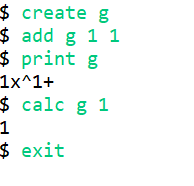
package section2;

import java.util.Scanner;

public class code7{

	static Polynomial2 polys[] = new Polynomial2 [100];
	static int n = 0;

	public static void main(String[] args) {

		Scanner kb = new Scanner(System.in);
		while(true) {
			System.out.print("$ ");
			String command = kb.next();
			if(command.equals("create")) {
				char name = kb.next().charAt(0);
				polys[n] = new Polynomial2();
				polys[n].terms = new Term2[100];
				polys[n].name = name;
				polys[n].nTerms = 0;
				n++;
			}
			else if(command.equals("add")) {
				char name = kb.next().charAt(0);
				int index = find(name);
				if(index==-1) {
					System.out.println("No such Polynomial exist");
				}
				else {
					int c = kb.nextInt();
					int e = kb.nextInt();
					polys[index].addTerm(c,e);

				}

			}
			else if(command.equals("calc")) {
				char name = kb.next().charAt(0);
				int index = find(name);
				if(index==-1) {
					System.out.println("No such Polynomial exist");
				}
				else {
					int x = kb.nextInt();
					int result = polys[index].calcPolynomial(x);
					System.out.println(result);
				}

			}
			else if(command.equals("print")) {
				char name = kb.next().charAt(0);
				int index = find(name);
				if(index==-1) {
					System.out.println("No such Polynomial exist");
				}
				else {
					polys[index].printPolynomial();
				}

			}
			else if(command.equals("exit")) {
				break;
			}
		}

		kb.close();

	}

	private static int find(char name) {
		for(int i =0;i<n;i++) {
			if(polys[i].name == name) {
				return i;
			}
		}
		return -1;
	}

}