연결리스트의 순회 : Iterator의 필요성


public 메서드들 만을 이용하여 연결리스트를 순회하려면?


Iterator


노드의 주소를 직접 사용자에게 제공하는 대신 그것을 private 멤버로

wrapping하고 있으면서 사용자가 필요로 하는 일을 해주는 public method를 

가진 Iterator 객체를 제공한다.


사용자가 연결리스트를 한방에 순차적으로 순회하기 위해서는

연결리스트의 전에 방문한 주소를 가지고있어야한다.

연결리스트의 노드의 주소를 직접 줄 수 없다 이유는

private 으로 지정되어있기때문이다.(Node)

그래서 그 주소를 private 멤버로 가지고 있으면서

그 주소가 가리키고 있는 노드의 데이터를 리턴해주고

자신은 한칸 앞으로 전진하는 Iterator 객체를 만들어

사용자에게 주므로 사용자는 Iterator를 이용하여 

순회 할 수 있다.


Iterator를 이용한 순회


MySingleLinkedList<String> aList = new MySingleLinkedList<String>();
aList.add("Some String");


Iterator<String>iter = aList.iterator();
	while(iter.hasNext()){
		String str = iter.next();
		//do something with str
}


java.util이 Iterator<E> 인터페이스를 정의한다.


MyLingkedList 클래스는 메서드 iterator() 제공


MySingleLinkedList<E> 클래스는 Iterator<E> 인터페이스를

 구현하는 하나의 클래스 inner 클래스로 가지며, iterator() 메서드는 

이 클래스의 객체를 생성하여 반환한다.


연결리스트에서의 Iterator


Iterator는 개념적으로는 연결리스트의 노드와 노드 사이를 가리킨다.


초기상태의 iterator는 첫 번째 노드의 앞 위치를 가리킨다.


next() 메서드는 한칸 전진하면서 방금 지나친 노드의 데이터를 반환


hasNext() 메서드는 다음 노드가 존재하면 true, 그렇지 않으면 false를 반환한다.


remove() 메서드는 가장 최근에 next() 메서드로 반환한 노드를 삭제한다.


객체지향 프로그래밍


Information Hiding

Data Encapsulation

Abstract Data Type 


본질적으로 비슷한 내용이다.


인터페이스와 구현의 분리가 가장 중요한 원칙이다.


연결리스트는 리스트 라는 추상적인 데이터 타입을 구현하는 

한가지 방법일 뿐이다. 


사용자는 리스트에 데이터를 삽입, 삭제, 검색할 수 있으면 된다.

그것의 구현에 대해서 세부적으로 알 필요는 없다.


인터페이스와 구현을 분리하면 코드의 모듈성이 증가하며,

코드의 유지/보수, 코드의 재사용이 용이해진다.


사용자는 Interface만 알면 되고

Implementation에 대해서는 알 필요도 없고

알 수도 없게 해야한다.


package section7;

import section6.Node;

public class MySingleLinkedList<T> {
	
	public Node<T> head;
	public int size = 0;
	
	public MySingleLinkedList() {
		head = null;
		size = 0;
	}
	

private static class Node<T> {
	
	public T data;
	public Node<T> next;
	
	public Node(T data){
		this.data = data;
		next = null;
	}
	
}
	
	private void addFirst(T item) {
		Node<T> newNode = new Node<T>(item);
		newNode.next = head;
		head = newNode;
		size++;
	}
	
	private void addAfter(Node<T> before, T item) {
		Node<T> temp = new Node<T>(item);
		temp.next = before.next;
		before.next = temp;
		size++;
	}
	
	
	private T removeFirst() { //delete
		if(head==null) {
			return null;
		}
		else {
			T temp = head.data;
			head = head.next;
			size--;
			return temp;
		}
	}
	
	private T removeAfter(Node<T> before) {
		if(before.next==null) {
			return null;
		}
		else {
			T temp = before.next.data;
			before.next = before.next.next;
			return temp;
		}
		
	}
	
	public int indexOf(T item) { //search
		Node<T> p = head;
		int index = 0;
		while(p != null) {
			if(p.data.equals(item)) {
				return index;
			}
			else {
				p = p.next;
				index++;
			}
		}
		return -1;
	}
	
	private Node<T> getNode(int index){
		if(index<0 || index>=size) {
			return null;
		}
		else {
			Node<T> p = head;
			for(int i=0; i<index; i++) {
				p =p.next;
			}
			return p;
		}
		
	}
	
	public T get(int index) {
		if(index<0 || index>=size) {
			return null;
		}
			return getNode(index).data;		
	}
	
	public void add(int index, T item) {
		if(index <0||index >size) {
			return;
		}
		if(index==0) {
			addFirst(item);
		}
		else {
		Node<T> q = getNode(index-1);
		addAfter(q, item);
		}
	}
	
	public T remove(int index) {
		if(index < 0 || index >= size) {
			return null;
		}
		if(index ==0) {
			return removeFirst();
		}
		Node<T> prev = getNode(index-1);
		return removeAfter(prev);
	}
	
	public T remove(T item) {
		Node<T> p = head;
		Node<T> q = null;
		while(p != null && !p.data.equals(item)) {
			q = p;
			p=p.next;
		}
		if(p==null)
			return null;
		if(q==null)
			return removeFirst();
		else
			return removeAfter(q);	
	}
	
	public int size() {
		return size;
	}
	
	public static void main(String[] args) {
		
	}

}

기존에 만들었던 연결리스트 클래스이다.


인터페이스와 구현의 분리를 위해 

이너 클래스로 Node 클래스를 내부에 생성하고

Node 클래스를 이용하는 메서드들을 private로

변경해주는 작업을 하였다.


인터페이스를 생성하여


T get(int index)

void add(int index, T item)

T remove(int index)

boolean remove(T item)

int indexOf(T item)

int size()


메서드를 정의할 것이다.

이번에는  T 타입 데이터와 같은 노드노드를

삭제하는 기능을 하는 메서드를 구현해보았다.


하지만 그 노드를 찾았다고 하더라도

그 전 노드의 주소를 알 수 없기때문에 

문제가 있었다.

삭제할 노드가 아니라 직전 노드의 주소가 필요하다.

	public T remove(T item) {
		Node<T> p = head;
		Node<T> q = null;
		while(p != null && !p.data.equals(item)) {
			q = p;
			p=p.next;
		}
		if(p==null)
			return null;
		if(q==null)
			return removeFirst();
		else
			return removeAfter(q);	
	}

그 문제를 해결한 코드이다.

항상 그 전 노드를 가리키는 참조변수를 만들어서

처리하는 코드이다.


만일  p가 null이라면 찾는 값이 존재하지 않기때문에

null을 리턴하고


첫번째 노드부터 값을 찾은 경우라면?

q가 null이다.

그때는 removeFirst로 삭제를 한다.


그렇지않다면 removeAfter로 삭제를 한다.

타입으로 조회시 같은 타입의 스프링 빈이 둘 이상이면 오류가 발생한다. 

이때는 빈 이름을 지정하면 된다.

ac.getBeansOfType() 메서드를 사용하면 해당 타입의 모든 빈을 조회할 수 있다.


package hello.core.beanfind;

import hello.core.AppConfig;
import hello.core.discount.DiscountPolicy;
import hello.core.member.MemberRepository;
import hello.core.member.MemoryMemberRepository;
import org.junit.jupiter.api.DisplayName;
import org.junit.jupiter.api.Test;
import org.springframework.context.annotation.AnnotationConfigApplicationContext;
import org.springframework.context.annotation.Bean;
import org.springframework.context.annotation.Configuration;

public class ApplicationContextSameBeanFindTest {

    AnnotationConfigApplicationContext ac = new AnnotationConfigApplicationContext(SameBeanConfig.class);

    @Test
    @DisplayName("타입으로 조회시 같은 타입이 둘 이상 있으면, 중복오류가 발생한다.")
    void findBeanByTypeDuplicate(){
        MemberRepository bean = ac.getBean(MemberRepository.class);
    }

    @Configuration
    static class SameBeanConfig{

        @Bean
        public MemberRepository memberRepository1(){
            return new MemoryMemberRepository();
        }

        @Bean
        public MemberRepository memberRepository2(){
            return new MemoryMemberRepository();
        }
    }
}

AppConfig를 건들지 않고 실험해보기위해

SameBeanConfig 라는 설정 클래스를 생성하였다.

두 개의 빈 모두 MemoryMemberRepository 타입이라 

오류가 발생하는 것을 확인할 수 있었다.


package hello.core.beanfind;

import hello.core.AppConfig;
import hello.core.discount.DiscountPolicy;
import hello.core.member.MemberRepository;
import hello.core.member.MemoryMemberRepository;
import org.junit.jupiter.api.DisplayName;
import org.junit.jupiter.api.Test;
import org.springframework.beans.factory.NoUniqueBeanDefinitionException;
import org.springframework.context.annotation.AnnotationConfigApplicationContext;
import org.springframework.context.annotation.Bean;
import org.springframework.context.annotation.Configuration;

import java.util.Map;

import static org.assertj.core.api.Assertions.*;
import static org.junit.jupiter.api.Assertions.*;

public class ApplicationContextSameBeanFindTest {

    AnnotationConfigApplicationContext ac = new AnnotationConfigApplicationContext(SameBeanConfig.class);

    @Test
    @DisplayName("타입으로 조회시 같은 타입이 둘 이상 있으면, 중복오류가 발생한다.")
    void findBeanByTypeDuplicate(){
        assertThrows(NoUniqueBeanDefinitionException.class,
                () -> ac.getBean(MemberRepository.class));
    }

    @Test
    @DisplayName("타입으로 조회시 같은 타입이 둘 이상 있으면, 빈 이름을 지정하면 된다.")
    void findBeanByName(){
        MemberRepository memberRepository = ac.getBean("memberRepository1",MemberRepository.class);
        assertThat(memberRepository).isInstanceOf(MemberRepository.class);
    }

    @Test
    @DisplayName("특정 타입을 모두 조회하기")
    void findAllBeanByType(){
        Map<String, MemberRepository> beansOfType = ac.getBeansOfType(MemberRepository.class);
        for (String key : beansOfType.keySet()) {
            System.out.println("key = " + key+" value = "+ beansOfType.get(key));
        }
        System.out.println("beansOfType = " + beansOfType);
        assertThat(beansOfType.size()).isEqualTo(2);
    }

    @Configuration
    static class SameBeanConfig{

        @Bean
        public MemberRepository memberRepository1(){
            return new MemoryMemberRepository();
        }

        @Bean
        public MemberRepository memberRepository2(){
            return new MemoryMemberRepository();
        }
    }
}

여러 테스트를 진행해보았다.

스프링 컨테이너에서 스프링 빈을 조회하는

방법에 대해서 공부해보았다.


1. ac.getBean(빈이름, 타입)

2. ac.Bean(타입)


조회 대상 스프링 빈이 없다면 예외가 발생한다.!


package hello.core.beanfind;

import hello.core.AppConfig;
import hello.core.member.MemberService;
import hello.core.member.MemberServiceImpl;
import org.assertj.core.api.Assertions;
import org.junit.jupiter.api.DisplayName;
import org.junit.jupiter.api.Test;
import org.springframework.beans.factory.NoSuchBeanDefinitionException;
import org.springframework.context.annotation.AnnotationConfigApplicationContext;

import static org.assertj.core.api.Assertions.*;
import static org.junit.jupiter.api.Assertions.*;

class ApplicationContextBasicFindTest {

    AnnotationConfigApplicationContext ac = new AnnotationConfigApplicationContext(AppConfig.class);

    @Test
    @DisplayName("빈 이름으로 조회")
    void findBeanByName(){
        MemberService memberService = ac.getBean("memberService", MemberService.class);
        assertThat(memberService).isInstanceOf(MemberServiceImpl.class);
    }

    @Test
    @DisplayName("이름없이 타입으로만 조회")
    void findBeanByType(){
        MemberService memberService = ac.getBean(MemberService.class);
        assertThat(memberService).isInstanceOf(MemberServiceImpl.class);
    }

    @Test
    @DisplayName("구체 타입으로 조회")
    void findBeanByName2(){
        MemberService memberService = ac.getBean("memberService", MemberServiceImpl.class);
        assertThat(memberService).isInstanceOf(MemberServiceImpl.class);
    }

    @Test
    @DisplayName("빈 이름으로 조회X")
    void findBeanByNameX(){
        assertThrows(NoSuchBeanDefinitionException.class,
                () -> ac.getBean("XXX", MemberService.class));
    }
}

구체 타입으로 조회도 가능하지만

무분별하게 쓰는 것은 좋지 않다 역할에 의존하도록 설계해야하기 때문이다.


또한 예외가 터질때도 테스트해보아야 하는 것이 중요하다.

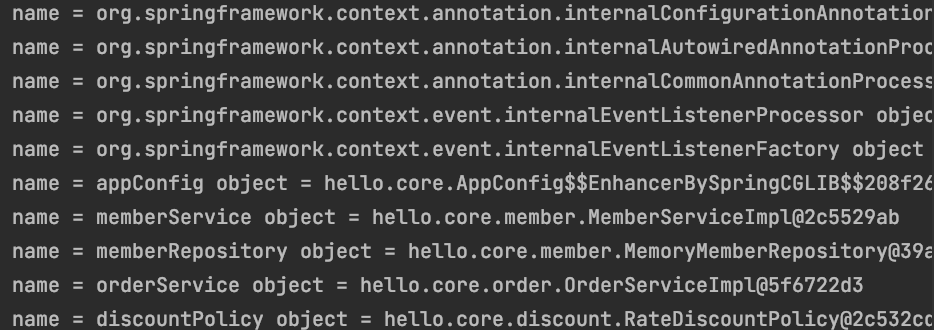
스프링 컨테이너에 실제 스프링 빈들이 잘 등록되었는지 확인해보았다.


package hello.core.beanfind;

import hello.core.AppConfig;
import org.junit.jupiter.api.DisplayName;
import org.junit.jupiter.api.Test;
import org.springframework.beans.factory.config.BeanDefinition;
import org.springframework.context.annotation.AnnotationConfigApplicationContext;

public class ApplicationContextInfoTest {

    AnnotationConfigApplicationContext ac = new AnnotationConfigApplicationContext(AppConfig.class);

    @Test
    @DisplayName("모든 빈 출력하기")
    void findAllBean(){
        String[] beanDefinitionNames = ac.getBeanDefinitionNames();
        for (String beanDefinitionName : beanDefinitionNames) {
            Object bean = ac.getBean(beanDefinitionName);
            System.out.println("name = "+beanDefinitionName+" object = "+ bean);

        }
    }    @Test
    @DisplayName("애플리케이션 빈 출력하기")
    void findApplicationBean(){
        String[] beanDefinitionNames = ac.getBeanDefinitionNames();
        for (String beanDefinitionName : beanDefinitionNames) {
            BeanDefinition beanDefinition = ac.getBeanDefinition(beanDefinitionName);

            if(beanDefinition.getRole() == BeanDefinition.ROLE_APPLICATION){
                Object bean = ac.getBean(beanDefinitionName);
                System.out.println("name = "+beanDefinitionName+" object = "+ bean);
            }
        }
    }


}

테스트 코드를 이용하여 찾아보았다.


모든 빈 출력하기


ac.getBeanDefinitionNames() 는 스프링에 등록된 모든 빈 이름을 조회한다.

ac.getBean() 은 빈 이름으로 빈 객체를 조회한다.

내가 직접 등록하지 않고 내부에 등록된 빈 들까지 출력해준다.


애플리케이션 빈 출력하기


스프링 내부에서 사용하는 빈은 제외하고 내가 등록한 빈만 출력할 수도 있다.

스프링이 내부에서 사용하는 빈은 getRole() 로 구분할 수 있다.

ROLE_APPLICATION 은 사용자가 정의한 빈이고

ROLE_INFRASTRUCTURE은 스프링 내부에서 사용하는 빈이다.


스프링 컨테이너와 스프링 빈에 대해서 알아보았다.


기존에는 스프링의 핵심원리, 객체지향과

왜스프링이 만들어졌을까? 에 대해서 공부하였다.


스프링 컨테이너 생성


스프링 컨테이너가 생성되는 과정은 

ApplicationContext applicationContext = new AnnotationConfigApplicationContext(AppConfig.class);

new AnnotationConfigApplicationContext 객체를 생성하면서 AppConfig를 파라미터로 넘기면

반환값으로 applicationContext가 반환되었다.


ApplicationContext를 스프링 컨테이너라 한다.


ApplicationContext는 인터페이스이다.


AppConfig를 사용했던 방식이 애노테이션 기반의 자바 설정 클래스로 스프링 컨테이너를 만든 것이다.


스프링 컨테이너 생성 과정


1. 스프링 컨테이너 생성

https://www.inflearn.com/course/%EC%8A%A4%ED%94%84%EB%A7%81-%ED%95%B5%EC%8B%AC-%EC%9B%90%EB%A6%AC-%EA%B8%B0%EB%B3%B8%ED%8E%B8/lecture/55352?tab=note&mm=null&speed=0.75

new AnnotationConfigApplicationContext(AppConfig.class)라고 하면서 AppConfig의 정보를 넘긴다.


스프링 컨테이너가 만들어진다. 스프링 컨테이너 안에는 스프링 빈 저장소라는게 있다. 키는 빈 이름

값은 빈 객체가된다.


AppConfig.class를 파라미터로 넘기면 이 정보를 보고 객체생성을 해야겠다고 인지를 하게된다.


2. 스프링 빈 등록

https://www.inflearn.com/course/%EC%8A%A4%ED%94%84%EB%A7%81-%ED%95%B5%EC%8B%AC-%EC%9B%90%EB%A6%AC-%EA%B8%B0%EB%B3%B8%ED%8E%B8/lecture/55352?tab=note&mm=null&speed=0.75

스프링 컨테이너가 생성하면서 스프링 빈 저장소에

스프링 빈을 등록한다. 설정정보를 @Bean을 보고 호출을한다. 

메서드 이름을 키로 가지고 값은 객체를 가진다.

이것을 스프링 빈이라고 한다.


빈 이름은 메서드 이름을 사용하는데

임의로 직접 부여할 수 도있다. 

빈 이름은 항상 다른 이름을 부여해야한다. 같은 이름을 부여하면 

다른 빈이 무시되거나 기존 빈을 덮어버리거나 설정에 따라 오류가 발생한다.


3. 스프링 빈 의존관계 설정 -준비-

https://www.inflearn.com/course/%EC%8A%A4%ED%94%84%EB%A7%81-%ED%95%B5%EC%8B%AC-%EC%9B%90%EB%A6%AC-%EA%B8%B0%EB%B3%B8%ED%8E%B8/lecture/55352?tab=note&mm=close&speed=0.75

스프링 빈을 등록 한 후 


4. 스프링 빈 의존관계 설정 -완료-

https://www.inflearn.com/course/%EC%8A%A4%ED%94%84%EB%A7%81-%ED%95%B5%EC%8B%AC-%EC%9B%90%EB%A6%AC-%EA%B8%B0%EB%B3%B8%ED%8E%B8/lecture/55352?tab=note&mm=close&speed=0.75

memberService의 의존관계로memberRepository를 넣어주고

orderService는 memberRepository도 의존하고 discountPolicy도 의존한다.

스프링 컨테이너는 설정 정보를 참고해서 의존관계를 주입한다.

단순히 자바 코드를 호출하는 것 같지만, 차이가 있다. 이 차이는 뒤에 싱글톤 컨테이너에서 공부할 것이다.


스프링은 빈을 생성하고, 의존관계를 주입하는 단계가 나누어져 있다.

그런데 이렇게 자바 코드로 스프링 빈을 등록하면 생성자를 호출하면서 의존관계 주입도 한번에 처리된다.

이 그림은 이해를 돕기위해 개념적으로 나누어 설명했다.


연결리스트의 노드들을 처음부터 순서대로 방문하는 것을 순회한다고 말한다.

indexOf 메서드는 입력된 데이터 item과 동일한 데이터를 저장한 노드를 

찾아서 그 노드번호를 반환한다. 그것을 위해서 연결리스트를 순회한다.


getNode는 입력으로 index를 받아서 

index번째 노드의 주소를 리턴하는 함수이다.


추가로 

이전에 만들었던 추가,삭제하는 메서드들을

하나로 통합하였다.


package section6;

public class MySingleLinkedList<T> {
	
	public Node<T> head;
	public int size = 0;
	
	public MySingleLinkedList() {
		head = null;
		size = 0;
	}
	
	public void addFirst(T item) {
		Node<T> newNode = new Node<T>(item);
		newNode.next = head;
		head = newNode;
		size++;
	}
	
	public void addAfter(Node<T> before, T item) {
		Node<T> temp = new Node<T>(item);
		temp.next = before.next;
		before.next = temp;
		size++;
	}
	
	
	public T removeFirst() { //delete
		if(head==null) {
			return null;
		}
		else {
			T temp = head.data;
			head = head.next;
			size--;
			return temp;
		}
	}
	
	public T removeAfter(Node<T> before) {
		if(before.next==null) {
			return null;
		}
		else {
			T temp = before.next.data;
			before.next = before.next.next;
			return temp;
		}
		
	}
	
	public int indexOf(T item) { //search
		Node<T> p = head;
		int index = 0;
		while(p != null) {
			if(p.data.equals(item)) {
				return index;
			}
			else {
				p = p.next;
				index++;
			}
		}
		return -1;
	}
	
	public Node<T> getNode(int index){
		if(index<0 || index>=size) {
			return null;
		}
		else {
			Node<T> p = head;
			for(int i=0; i<index; i++) {
				p =p.next;
			}
			return p;
		}
		
	}
	
	public T get(int index) {
		if(index<0 || index>=size) {
			return null;
		}
			return getNode(index).data;		
	}
	
	public void add(int index, T item) {
		if(index <0||index >size) {
			return;
		}
		if(index==0) {
			addFirst(item);
		}
		else {
		Node<T> q = getNode(index-1);
		addAfter(q, item);
		}
	}
	
	public T remove(int index) {
		if(index < 0 || index >= size) {
			return null;
		}
		if(index ==0) {
			return removeFirst();
		}
		Node<T> prev = getNode(index-1);
		return removeAfter(prev);
	}
	
	public static void main(String[] args) {
		
	}

}

특정 노드의 뒤에 넣는 기능과

특정 노드의 앞에 넣는 기능을 구현해보았다.


특정 노드의 뒤에 넣는 기능은  특정 노드가 

가리키는 주소를 새로운 노드의 참조변수에 넣고

특정노드의 참조변수에 새로운 노드의 주소를 넣어주면

된다.


하지만 특정 노드의 앞에 넣는 기능은 그리 간단한 것이

아니다. 왜냐하면 각 노드들은 다음 주소를 가리키는 참조변수만

존재하고 이전 노드의 주소는 가지고 있지 않기에

굳이 기능을 구현하려면 첫번째 노드부터 시작해서 특정 노드 전까지의 

노드를 찾는 방법이 있을 수 있다. 


또한 

특정 노드의 첫번째 노드를 삭제하는 기능과

특정 노드를 삭제하는 기능을 구현해보았다.


특정 노드의 첫번째 노드를 삭제하는 기능은

헤드가 널값이 아닐때 헤드에 저장된 값을

특정 노드의 다음노드를 가리키게 하면된다.


특정노드를 삭제하는 기능은 

특정 노드의 이전 노드가 필요하다.

실제로는 그 앞노드의 참조변수를 건드려야하기 때문이다.

이전노드의 참조변수에 다음다음노드를 가리키게하면 된다.

그 이전에 그다음 노드가 존재해야만 가능하다.


package section6;

public class MySingleLinkedList<T> {
	
	public Node<T> head;
	public int size = 0;
	
	public MySingleLinkedList() {
		head = null;
		size = 0;
	}
	
	public void addFirst(T item) {
		Node<T> newNode = new Node<T>(item);
		newNode.next = head;
		head = newNode;
		size++;
	}
	
	public void addAfter(Node<T> before, T item) {
		Node<T> temp = new Node<T>(item);
		temp.next = before.next;
		before.next = temp;
		size++;
	}
	
	
	public T removeFirst() { //delete
		if(head==null) {
			return null;
		}
		else {
			T temp = head.data;
			head = head.next;
			size--;
			return temp;
		}
	}
	
	public T removeAfter(Node<T> before) {
		if(before.next==null) {
			return null;
		}
		else {
			T temp = before.next.data;
			before.next = before.next.next;
			return temp;
		}
		
	}
	
	public T get(int index) {  //get
		return null;
	}
	
	public int indexOf(T item) { //search
		return -1;
	}
	
	public static void main(String[] args) {
		
	}

}

지금까지 순수한 자바코드로만 DI를 적용하였는데

스프링을 사용하여 바꿔보는 작업을 공부하였다.


package hello.core;

import hello.core.member.Grade;
import hello.core.member.Member;
import hello.core.member.MemberService;
import hello.core.member.MemberServiceImpl;
import hello.core.order.Order;
import hello.core.order.OrderService;
import hello.core.order.OrderServiceImpl;
import org.springframework.context.ApplicationContext;
import org.springframework.context.annotation.AnnotationConfigApplicationContext;

public class OrderApp {
    public static void main(String[] args) {

        /*AppConfig appConfig = new AppConfig();
        MemberService memberService = appConfig.memberService();
        OrderService orderService = appConfig.orderService();*/

        ApplicationContext applicationContext = new AnnotationConfigApplicationContext(AppConfig.class);
        MemberService memberService = applicationContext.getBean("memberService",MemberService.class);
        OrderService orderService = applicationContext.getBean("orderService",OrderService.class);

        Long memberId = 1L;
        Member member = new Member(memberId, "memberA", Grade.VIP);
        memberService.join(member);

        Order order = orderService.createOrder(memberId, "itemA",20000);

        System.out.println("order = "+ order);
        System.out.println("order.calculatePrice = " + order.calculatePrice());
    }
}

OrderApp클래스의 주석부분과  밑에 3줄이 같은 역할을 한다!


하는 기능은 같지만 콘솔에 찍히는 것들이  ConfigApp에 메서드들을 Bean으로 등록한 것들이 뜨는 것을 볼 수 있다.


스프링 컨테이너


ApplicationContext를 스프링 컨테이너라 한다.


기존에는 개발자가 AppConfig를 사용해서 직접 객체를 생성하고 DI를 했지만, 이제부터는

스프링 컨테이너를 통해서 사용한다.


스프링 컨테이너는 @Configuration이 붙은 AppConfig를 구성정보로 사용한다. 여기서 @Bean이라 적힌 

메서드를 모두 호출해서 반환된 객체를 스프링 컨테이너에 등록한다. 이렇게 스프링 컨테이너에 등록된 객체를 스프링

빈이라 한다.


스프링 빈은 @Bean이 붙은 메서드 명을 스프링 빈의 이름으로 사용한다.


이전에는 개발자가 필요한 객체를 AppConfig를 사용해서 직접 조회했지만, 이제부터는 스프링 컨테이너를 통해서

필요한 스프링 빈(객체)를 찾아야 한다. 스프링 빈은 applicationContext.getBean() 메서드를 사용해서 찾을 수 있다.


기존에는 개발자가 직접 자바코드로 모든 것을 했다면 이제부터는 스프링 컨테이너에 객체를 스프링 빈으로 등록하고,

스프링 컨테이너에서 스프링 빈을 찾아서 사용하도록 변경하였다.


그런데??? 코드가 복잡해진 것처럼 느껴질 수도 있는데 굳이 이렇게해서 얻는 장점이 무엇일까?

지금부터 차차 알아가보자

지금까지는 객체지향 원리와 다형성을 가지고 진행하다가 다형성만으로는 한계를 느껴 DIP OCP를 지키며

설계하는 DI를 알아보았다. 

+ Recent posts